
How to Build an Android App: The Complete Guide for Beginners
Scope of Work

Android app development can be a powerful growth driver for both businesses and individuals seeking to tap into the world’s largest mobile ecosystem. With more than 3 billion active Android devices globally, the platform offers unparalleled opportunities for user reach, engagement, and revenue generation.
Whether you’re a startup launching your first mobile product or an enterprise looking to digitize and streamline operations, understanding the Android app development process is critical to success. In this guide, we walk you through everything you need to know about building an Android app from concept and planning to development and launch.
By the end of this article, you’ll have a clear, step-by-step roadmap to turn your app idea into a high-quality product and position it to stand out in the highly competitive Android marketplace.
How Android Apps Are Revolutionizing Business
In today’s fast-paced digital landscape, Android apps have become a major driver of business transformation. If you’re asking, “How do I build an Android app?”, this is the stage where the impact becomes clear. Android applications empower businesses to streamline operations, enhance customer experiences, and stay ahead of competitors in an increasingly mobile-first economy.
Below are seven key ways Android apps are reshaping how businesses operate and grow.
1. Greater Market Penetration
With Android holding the largest share of the global smartphone market, businesses can access an enormous and diverse user base. A well-designed Android app enables brands to reach customers across regions, demographics, and income levels—from urban centers to rural areas.
2. Improved Customer Engagement
Android apps enable direct, two-way communication with users through push notifications, in-app messaging, and personalized offers. This ongoing interaction enhances user experience, strengthens brand loyalty, and increases overall customer satisfaction.
3. Cost-Effective App Development
Thanks to Android’s open-source ecosystem and extensive developer community, app development is generally more cost-efficient. This makes Android an ideal platform for startups and SMEs looking to build feature-rich applications without exceeding their budgets.
4. Enhanced Operational Efficiency
Custom Android apps can automate core business processes such as inventory management, employee tracking, sales reporting, and customer support. Automation reduces manual work, minimizes errors, and significantly improves productivity.
5. Real-Time Data Collection and Insights
Android apps allow businesses to collect real-time data on user behavior, preferences, and purchasing patterns. These insights help companies make data-driven decisions, personalize services, and continuously refine their business strategies.
6. Mobile Commerce Enablement
An Android app provides a seamless mobile commerce experience, enabling customers to browse products, make secure payments, and track orders within a single platform. This convenience boosts conversion rates and encourages repeat purchases.
7. Stronger Competitive Advantage
In today’s digital-first marketplace, having an Android app signals innovation and adaptability. It enhances brand visibility, allows rapid updates based on user feedback, and helps businesses stay responsive to evolving market trends.
Read more: How Much Does It Cost to Build an Android App?
Top 10 Programming Languages for Android App Development
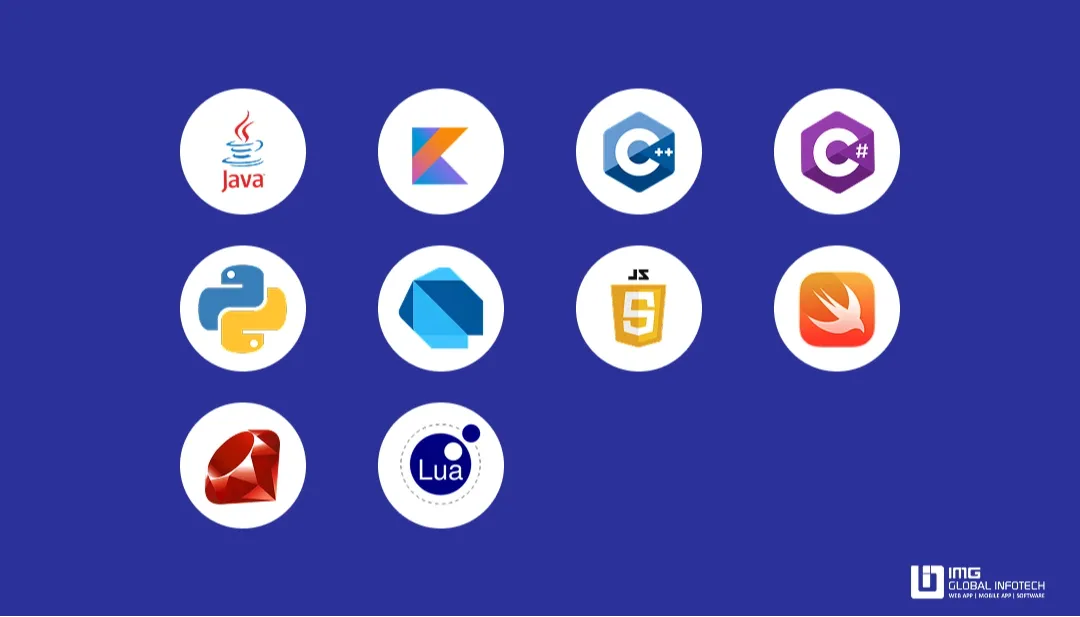
Choosing the right programming language is a critical decision in Android app development. Whether you’re a beginner building your first application or an experienced team delivering a large-scale product, the language you select directly impacts app performance, development speed, compatibility, maintenance, and future scalability.
Below are the most widely used programming languages for Android (and cross-platform) app development, along with their primary use cases.
1. Java
Java has long been the foundation of Android development and remains one of the most widely used languages. It offers a mature ecosystem, extensive documentation, strong community support, and a vast collection of libraries—making it a reliable choice for building robust and scalable Android applications.
2. Kotlin
Kotlin is the officially preferred language for modern Android development. It is concise, expressive, and fully interoperable with Java. With built-in null safety and modern language features, Kotlin is ideal for creating clean, secure, and high-performance Android apps.
3. C++
C++ is used in Android development through the Android Native Development Kit (NDK). It is well-suited for performance-critical components such as game engines, real-time processing, and graphics-intensive applications.
4. C#
C# is commonly used with the Xamarin framework to build cross-platform applications using .NET. It enables code sharing across Android, iOS, and Windows while still providing near-native performance and access to platform-specific features.
5. Python
Although Python is not natively supported on Android, frameworks like Kivy and BeeWare allow developers to build simple mobile apps and prototypes. Python is especially popular for rapid prototyping and for developers new to programming.
6. Dart
Dart powers Google’s Flutter framework, which enables developers to build visually rich, high-performance Android and iOS apps from a single codebase. Flutter and Dart have gained significant popularity in cross-platform development.
7. JavaScript
With frameworks such as React Native and Ionic, JavaScript can be used to create hybrid or cross-platform mobile applications. This is an excellent option for teams with a strong web development background looking to reuse existing skills.
8. Swift
Swift is primarily an iOS language but can be relevant in cross-platform development scenarios, such as Flutter or Kotlin Multiplatform projects, where Android development may be complemented by shared or parallel Swift codebases.
9. Ruby
Ruby, using frameworks like RubyMotion, can also be used for Android app development, though it is less common. Its clean and expressive syntax makes it suitable for rapid development and smaller projects.
10. Lua
Lua is a lightweight scripting language widely used in mobile game development, particularly for 2D games. It is often paired with game frameworks and SDKs such as Corona, making it a popular choice in the gaming space.
In summary, there is no one-size-fits-all language for Android app development. The best choice depends on your project requirements, performance needs, team expertise, and long-term technology strategy.
5 Steps to Build Android Apps
If you’re wondering how to build an Android app especially one that is scalable, user-friendly, and ready for long-term growth partnering with a professional Android app development company is often the most effective approach. Experienced teams follow a structured process that turns an idea into a reliable, market-ready product. Below are the five essential steps to building an Android app when working with an Android app development partner.
1. Define Application Requirements
The process begins with clearly defining your app’s objectives. This includes identifying your target audience, core features, business goals, timeline, and budget. At this stage, it’s crucial to communicate what success looks like for your app.
A reputable development company will help you refine your idea, recommend the right technology stack, outline project milestones, and provide realistic cost and delivery estimates.
2. Choose the Right Development Partner
Selecting the right Android app development partner requires careful research. Look for a company with proven experience, a strong portfolio, genuine client reviews, and end-to-end service capabilities—including UI/UX design, development, testing, deployment, and ongoing support.
Before sharing sensitive details, ensure an NDA is signed. A formal development agreement should also be in place to define scope, timelines, responsibilities, and deliverables before coding begins.
3. UI/UX Design and Wireframing
Once requirements are finalized, the design phase begins. UI/UX designers create wireframes, mockups, and interactive prototypes to visualize the app’s structure, navigation, and user flow.
A user-centered design approach ensures intuitive navigation, consistent branding, and an engaging user experience. Feedback and iteration during this stage help finalize the app’s look and feel before development starts.
4. App Development and Testing
With the design approved, developers begin building the app’s frontend and backend using appropriate technologies such as Kotlin or Java. The application is developed in modules and integrated with APIs, databases, and third-party services as needed.
Simultaneously, QA teams conduct functional, performance, security, and compatibility testing to ensure the app is stable, secure, and free of critical issues before launch.
5. Launch and Post-Deployment Support
After successful testing, the app is prepared for release and submitted to the Google Play Store in compliance with all publishing guidelines. Once live, the development team continues to monitor performance, address bugs, and incorporate user feedback.
Post-launch support often includes regular maintenance, updates, and scalability planning—ensuring your Android app remains reliable and future-ready from day one.
How Much Does Android App Development Cost?
The cost of Android app development can vary significantly depending on multiple factors, including feature complexity, development approach, timeline, and overall quality expectations. For a basic Android app, development costs typically range from $5,000 to $8,000. A mid-level application with more advanced features usually falls between $10,000 and $15,000, while custom enterprise-grade apps with complex functionality can easily exceed $15,000 or more.
Understanding what drives these costs will help you plan a realistic budget and avoid unexpected expenses during development. Below are the seven key factors that influence Android app development costs.
1. App Complexity and Functional Requirements
The more complex your app, the higher the development cost. Simple apps with basic features—such as user authentication, profiles, or search—are relatively affordable. In contrast, apps that include real-time chat, AI-powered features, payment gateways, or complex workflows require significantly more development time and expertise, increasing overall costs.
2. User Interface (UI) and User Experience (UX) Design
Well-designed UI/UX improves user engagement but can also raise development costs. Apps built with standard UI components are more cost-effective, while custom animations, advanced branding elements, and unique interaction designs require additional design and development effort.
3. Development Approach and Technology Stack
Your choice between native development (using Kotlin or Java) and cross-platform development (using frameworks like Flutter or React Native) directly impacts cost. Native apps typically deliver better performance and deeper system integration but are usually more expensive than cross-platform solutions.
4. Location of the Development Team
Development costs vary widely based on the geographical location of your development team. For example:
-
US / Canada: $15–$25 per hour
-
Europe: $15–$25 per hour
-
India / Asia: $12–$25 per hour
Hiring teams in regions with lower hourly rates can substantially reduce total development costs without compromising quality—if the right partner is chosen.
5. Backend Infrastructure
Apps that rely on real-time data, cloud services, APIs, or complex server-side logic require a robust backend infrastructure. Databases, admin dashboards, server hosting, and ongoing backend maintenance all contribute to higher development and operational costs.
6. Third-Party Integrations
Integrating third-party services—such as maps, payment gateways, analytics tools, or social logins—adds another layer of complexity. Some integrations also involve licensing or usage fees, which can increase the final project cost.
7. Testing, Maintenance, and Updates
Thorough testing is essential to ensure your app is stable, secure, and free of critical bugs at launch. Whether manual or automated, testing adds to development costs. Post-launch maintenance, updates, and future feature enhancements also require ongoing investment.
In summary, Android app development costs depend on your technology choices, feature scope, design expectations, and business objectives. By understanding these factors early, you can plan your budget more effectively and bring your Android app to market with confidence and control.
Why Choose HomeNest for Android App Development?
HomeNest is a trusted Android app development partner for businesses seeking scalable, high-performance, and user-centric mobile solutions. With years of industry experience, we specialize in building Android applications that align tightly with business goals while delivering exceptional user experiences.
Our certified developers work with a results-driven mindset, combining technical expertise with a deep understanding of product strategy. We follow a transparent, well-structured development process, leverage the latest Android technologies, and provide end-to-end services—from ideation and UI/UX design to development, launch, and post-deployment support.
With a strong track record across multiple industries, HomeNest is known for on-time delivery, consistent quality, and high client satisfaction. When you partner with us, you gain a team committed to building reliable products that scale with your business.
Conclusion
You now have a clear understanding of how to develop an Android app—from planning and design to development, testing, and launch. Whether you’re a startup launching your first product or an established enterprise expanding your digital presence, a well-built Android app can significantly accelerate growth and customer engagement.
Partnering with an experienced Android app development company ensures quality execution, faster time to market, and long-term maintainability. With the right process, the right technology, and certified professionals by your side, you can confidently bring your Android app to life and compete effectively in today’s dynamic mobile marketplace.
HomeNest Software – Empowering Long-Term Growth for Modern Businesses.

Contact Information:
- Address: The Sun Avenue, 28 Mai Chi Tho Street, Binh Trung Ward, Ho Chi Minh City
- Hotline: +84 898 994 298 ( WhatsApp )
- Website: homenest.software
HomeNest Services: Website Design – App Design – Software Development.
Frequently Asked Questions (FAQ)
About HomeNest Android App Development Services
Why should I choose HomeNest for Android app development?
HomeNest provides end-to-end Android app development services with a transparent workflow, certified developers, and a strong focus on business outcomes. We deliver scalable, high-performance apps with reliable timelines and long-term support.
Does HomeNest work with startups as well as enterprises?
Yes. HomeNest works with startups, SMEs, and enterprises. Our development approach is flexible and tailored to your budget, timeline, and growth objectives—whether you are building an MVP or an enterprise-grade application.
What technologies does HomeNest use for Android app development?
We leverage modern Android technologies such as Kotlin, Java, Jetpack libraries, scalable backend architectures, and secure APIs to ensure performance, reliability, and maintainability.
How long does it take to develop an Android app?
Development timelines vary based on complexity and features. A basic Android app typically takes 6–8 weeks, while more advanced or enterprise-level applications may require several months.
Does HomeNest provide post-launch support and maintenance?
Yes. We offer ongoing monitoring, bug fixes, performance optimization, feature enhancements, and regular maintenance to keep your app secure and up to date after launch.
Can HomeNest help upgrade or modernize an existing Android app?
Absolutely. We support app modernization, UI/UX improvements, performance optimization, and gradual migration from legacy Java codebases to Kotlin when needed.
Latest Articles
View All
Essential Tips To Develop A Music Streaming App
Discover expert tips to develop a successful music streaming app with HomeNest Software. This guide covers essential features, legal licensing, and scalable technology stacks. Learn how to build a robust, cross-platform application with AI personalization to stand out in the 2026 competitive audio market.
How to Build a Language Learning App Like Cake
Discover how to build a successful language learning app like Cake with this comprehensive guide from HomeNest Software. We explore market research, essential MVP features, advanced AI integrations, tech stack selection, and estimated development costs. Partner with HomeNest Software to create a scalable, gamified, and highly engaging educational platform tailored to your business goals. Start your app development journey with us today.
How to Build an App Like TaskRabbit: Features, Cost, Tech Stack – Business Model
Building an app like TaskRabbit is more than replicating existing features—it’s about creating a trusted marketplace that seamlessly connects customers with skilled service providers. By combining an intuitive user experience, secure payment systems, scalable architecture, and the right business model, you can launch a competitive on-demand platform. Partnering with an experienced app development company like HomeNest Software ensures your product is built with the technology, flexibility, and long-term scalability needed to succeed in the rapidly growing gig economy.
How to Build a Meal Planning App: A Complete Step-by-Step Guide
Building a successful meal planning app goes beyond creating an attractive interface it requires a clear business strategy, personalized user experiences, and scalable technology. By combining essential features like AI-powered meal recommendations, nutrition tracking, grocery list automation, and wearable integration, businesses can deliver lasting value to users while capitalizing on the growing digital health market. Partnering with an experienced mobile app development company ensures your solution is secure, future-ready, and designed to succeed in an increasingly competitive health-tech industry.
How Much Does It Cost to Build a Shopping App Like Temu?
Temu’s meteoric rise to over 900 million global downloads proves the power of combining AI, gamification, and social commerce, but building a similar viral shopping platform requires careful financial and technical planning. Developing an app like Temu typically costs anywhere from $40,000 for a basic Minimum Viable Product (MVP) to over $300,000 for a fully-featured platform. This guide breaks down every cost category, analyzes the core features driving Temu’s success, highlights the best technology stacks, and offers practical strategies to optimize your development budget without compromising on quality.

Criteria For Choosing The Right App Design Agency
UI/UX design is the logical foundation of a system, not merely a visual element. Choosing the wrong partner will directly lead to technical debt, budget overruns, and disruptions in the development process. This article provides a 6-step evaluation framework and a list of operational risks, helping businesses eliminate subjective design advice and accurately assess agency capabilities based on developer handoff standards and practical business performance.