If you want to learn how to launch an app on the Android and iOS platforms, you are at the right place.
Our Experience with Launching Applications
At HomeNest Software, we bring extensive experience as a trusted app development partner, having built hundreds of Android and iOS applications. We know precisely how to launch an app successfully—ensuring it meets all platform guidelines and avoids rejection from Google or Apple.
In this guide, you’ll learn the step-by-step app launch process we follow for every project.
Before diving into the full process, let’s walk through the essential steps you need to keep in mind before launching your application.
Want to Launch Your Own App?
Looking to validate your app idea?
Need expert guidance or a free consultation?
Our specialized app development team is here to help you bring your concept to life and launch it successfully.
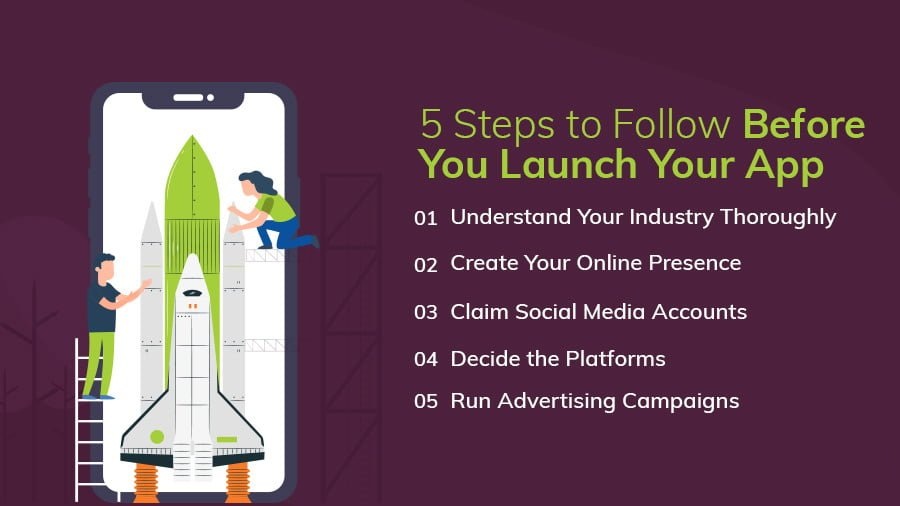
Follow These 5 Steps Before Launching an App
Once you understand how to create an app, the next big question is:
How do you launch it successfully?
To help you enter the highly competitive app ecosystem with confidence, we’ve compiled the essential steps you must take before submitting your app to the stores.
1. Understand Your Industry Thoroughly
Before you even think about launching, conduct detailed market research.
With over 2.09 million apps on the Apple App Store and 3.14 million on Google Play, competition is stronger than ever.
Knowing your industry, audience expectations, and market standards will give your app a better chance to stand out.
2. Create Your Online Presence
Your app needs a digital home.
Build a website that includes:
-
App details
-
Key features
-
Screenshots
-
Support or FAQ section
This not only boosts credibility but also helps attract early users and address their questions.
3. Claim Your Social Media Accounts
Social media is a powerful tool for pre-launch awareness.
By setting up your accounts early, you can:
This helps you gain traction even before your app goes live.
4. Decide the Platforms for Launch
After establishing your presence online, determine which platforms to launch on—iOS, Android, or both.
A strong app launch strategy includes:
-
Identifying where your target audience spends time
-
Conducting market research
-
Preparing a press kit
-
Crafting your launch messaging
Strategic platform selection can significantly boost your app’s performance from day one.
5. Run Pre-Launch Advertising Campaigns
Before your app hits the stores, promote it through well-planned ad campaigns aimed at your ideal users.
This helps you:
-
Build excitement
-
Ensure early downloads
-
Gather initial feedback
-
Increase visibility
Pre-launch marketing often sets the foundation for long-term success.
Now that you’ve covered the essential pre-launch steps, let’s look at the checklist you can follow for a smooth and successful app launch.
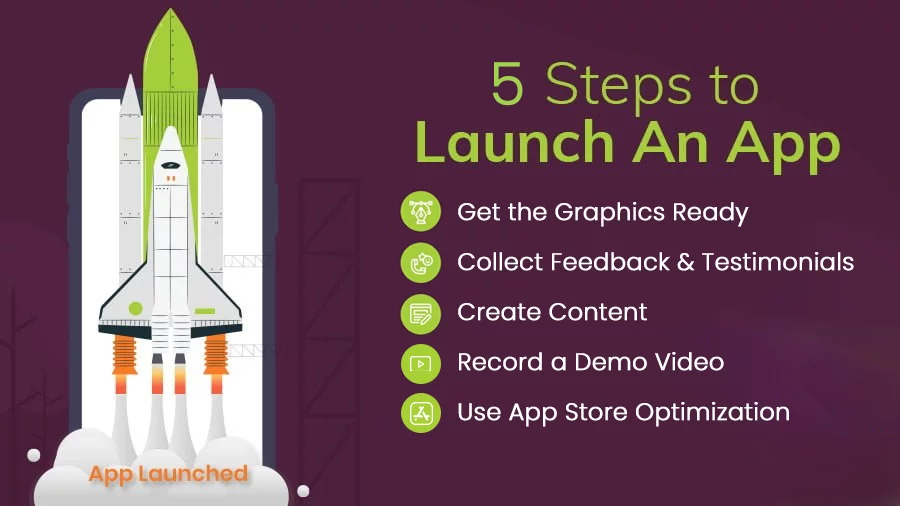
Follow These 5 Steps to Launch an App
Even with a strong marketing strategy, you may still be wondering: How do you properly launch a mobile app?
Here are the essential steps to ensure a smooth and successful app launch.
1. Prepare All Visual Assets
High-quality graphics and screenshots are crucial for capturing users’ attention on the App Store and Google Play. Prepare:
-
App screenshots
-
App icons
-
Promotional banners
-
A press kit, if possible
Having these assets ready will significantly streamline your launch process.
2. Collect Feedback & Testimonials
User testimonials strengthen your app listing.
Before launch:
-
Recruit beta testers via social media or community groups
-
Gather testimonials about your app’s usefulness
-
Use their feedback to refine your product
These early reviews help build trust and credibility.
3. Create Supporting Content
Content plays a major role in a successful app launch. Consider creating:
-
Blog posts
-
Landing pages
-
Guest articles
-
Email newsletters
Start your market research early and prepare a marketing plan tailored to your target audience. This ensures you attract the right users even before the official release.
4. Record a Demo Video
A demo video helps users quickly understand:
As thousands of apps compete for user attention, a well-made video can set your app apart and improve conversion rates.
5. Use App Store Optimization (ASO)
App Store Optimization improves your app’s visibility inside app stores. To maximize discoverability:
-
Add relevant keywords to your app title and description
-
Choose accurate categories
-
Upload high-quality screenshots that highlight key use cases
A well-optimized listing increases the chances of ranking higher and getting more organic downloads.
Now that you know what to do before and during the app launch, let’s move on to what comes after the launch—so you can attract more users and achieve strong install numbers.
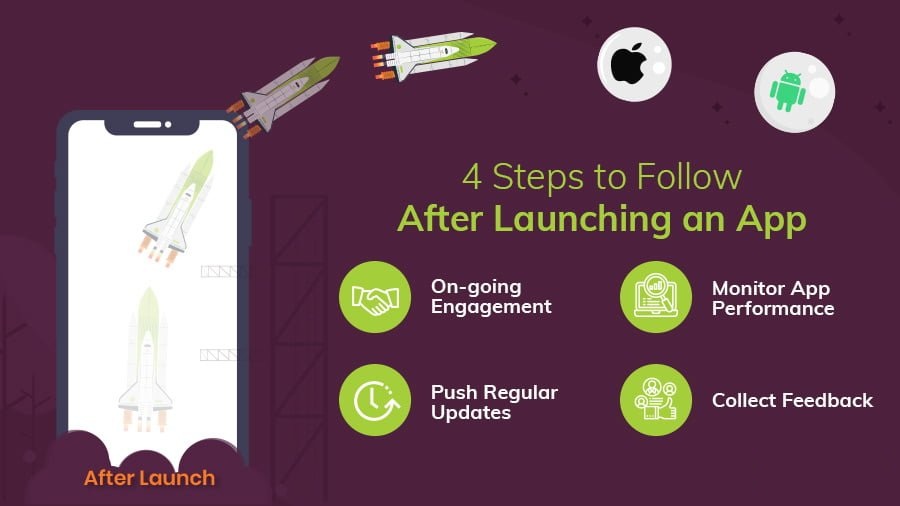
Follow These 6 Steps After Launching Your App
Launching your app is only the beginning. What truly determines its success is what you do after it goes live. So how do you market your app effectively? How do you attract new customers? Here are six essential steps to follow once your app is launched.
1. Maintain Ongoing User Engagement
After launch, shift your focus toward increasing user engagement and expanding your audience.
This can be done through:
-
Strategic social media marketing
-
Paid campaigns
-
Community-building activities
-
Events or promotional offers
Consistent marketing efforts are key to driving more downloads and keeping your users active.
2. Monitor App Performance Regularly
Your app’s performance has a direct impact on its success. Continuously monitor:
-
Load times
-
Crash reports
-
User ratings
-
Feature usage
Make sure your app maintains a strong rating across stores. A smooth, reliable experience keeps users satisfied and reduces churn.
3. Release Regular Updates
In a highly competitive app market, frequent updates help your app stay relevant.
Make updates a priority by:
Regular improvements show users that the app is active, supported, and continuously evolving.
4. Collect and Apply User Feedback
After launch, gather as much user feedback as possible.
You can do this by:
-
Checking the review section on app stores
-
Asking friends, colleagues, or beta testers
-
Conducting in-app surveys
Feedback helps you understand user expectations, identify pain points, and prioritize improvements that attract new users and retain existing ones.
5. Improve Your Onboarding Process
Getting users to install your app is only half the challenge. Retaining them starts with a smooth onboarding experience.
Here’s how to enhance it:
-
Clearly communicate the benefits of using your app
-
Include in-app tutorials or walkthrough videos
-
Highlight essential features and important buttons
-
Keep the onboarding steps simple and intuitive
A strong onboarding process increases activation and long-term engagement.
6. Track Feature Usage and User Behavior
Beyond feedback, you need data.
App analytics reveal:
-
Which features users love
-
Which features they ignore
-
Where users drop off
-
How users interact with the interface
Sometimes, even basic features may deliver more value than expected. Analytics help you make smarter product decisions and refine your marketing strategy. They also uncover insights users might not express directly.
Continuous monitoring, a forward-thinking approach, and strategic enhancements are key to driving long-term app growth.
Want to Create and Launch a Successful App?
Looking to build a high-quality mobile app?
Connect with our expert app developers and validate your app idea with a free consultation.
We’re here to help you turn your concept into a successful, scalable mobile application.
Checklist to Launch an App
After completing all the steps of the mobile app development process, use the following checklist to ensure you’re fully prepared for a successful app launch:
-
Beta Testing – Make sure your app is thoroughly tested, stable, and ready for real users.
-
App Analytics – Set up tracking tools to monitor user behavior and gather insights for improvements.
-
Website & Landing Page – Ensure your site and landing page are live, informative, and optimized for conversions.
-
Video Trailer – Create a short demo video showcasing key features to drive organic downloads.
-
Press Kit – Prepare a complete press kit including a press release, app icon, screenshots, demo video, and company details.
-
Social Media – Optimize and activate your social channels to build awareness and excitement before launch.
-
Push Notifications – Plan initial notifications and content to keep new users engaged from day one.
Now, let’s walk through the steps to publish your Android app on the Google Play Store.
How to Publish an App on Google Play Store
You may be surprised to learn that Google Play users downloaded 111.3 billion apps in 2021, up from 76 billion in 2018—an impressive indication of the platform’s massive reach and growth.
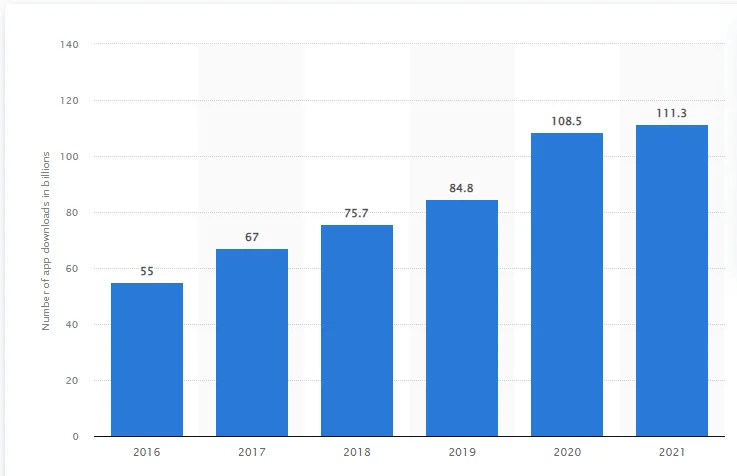
Publishing an Android app on the Google Play Store involves several important steps. Once your final build is ready, you’ll need to upload it to the Google Play Developer Console and ensure it complies with all of Google’s publishing guidelines.
Below is a simplified guide to help you upload and publish your app on the Play Store. Unlike iOS, the review process for Android apps is generally faster, often taking only a few hours to 2–3 business days.
Now, let’s move on to how you can publish your iOS app on the Apple App Store.
How to Launch an App on the Apple App Store
According to LifeWire, the Apple App Store hosts over 1.8 million apps, and this number continues to grow every day. With such intense competition, knowing the correct submission process is crucial to ensure your app gets approved.
To launch your app on the App Store, you must first register as an Apple Developer. After joining the Apple Developer Program, you can begin the submission process by carefully following Apple’s requirements and guidelines.
If you’re unsure how to upload an app to the App Store, refer to our detailed guide for step-by-step instructions.
Keep in mind that Apple enforces strict review guidelines, and your app must comply with all of them to be approved.
On average, it takes 2 to 4 business days for an iOS app to be reviewed and published—though this depends on how well your submission meets Apple’s standards.
Now that we’ve covered how to launch apps on both Google Play and the App Store, let’s take a look at how we handle the end-to-end app launch process from scratch.
The Secret Behind How We Do It
In today’s highly competitive market, a “million-dollar idea” alone is not enough.
If you’re planning to pitch your concept to investors, you’ll need a solid startup business plan to support your vision.
Don’t know how to build one?
Check out our in-depth guide on creating a powerful startup business plan for your mobile app idea.
Below is a breakdown of our proven process for taking an app idea from concept to launch.
1. Ideation
Everything begins with a conversation.
Our expert Business Analyst connects with clients, responds to inquiries submitted through our Contact Us page, and begins exploring the project vision.
Once we understand the core idea, our team:
We compile all insights into a structured document and share it with the client for review.
From here, we move to Step 2: Validation.
2. Validation
After initial discussions, we determine whether the idea has real potential.
Our validation process includes:
-
Customer interviews
-
Focus groups
-
Competitor analysis
-
Audience surveys
-
Marketplace research
This ensures the idea is viable, scalable, and aligned with market demand.
Once the client approves the concept and business strategy, we proceed to development.
3. MVP Development
We always recommend building an MVP (Minimum Viable Product) first.
An MVP allows you to:
-
Launch faster
-
Test the core idea with real users
-
Gather meaningful feedback
-
Reduce development risks
-
Improve the app iteratively
Only after evaluating user responses do we move toward full-feature development.
4. User Experience (UX)
During MVP development, our UX specialists ensure the app is:
-
Clean
-
Intuitive
-
User-friendly
From the sign-in screen to checkout or confirmation pages, every UX detail is designed to make navigation seamless and enjoyable.
5. User Interface (UI)
UI is where your product comes to life.
Our professional UI designers create:
-
Visually stunning layouts
-
Consistent branding
-
Easy-to-navigate elements
-
Highly accessible visual components
A strong UI builds trust, increases retention, and enhances overall usability.
6. Quality Assurance & Testing
This is the final stage before launch.
Our QA engineers rigorously test the app using:
-
Manual testing
-
Automated testing
-
Usability testing
-
Security checks
-
Performance audits
They fine-tune user flows, remove bugs, and refine every element to give your app the best chance for success.
After QA approval, the build is shared with the client for final review.
Once approved, we prepare the complete mobile app launch strategy.
Why This Works
Each step requires deep expertise and attention to detail.
At HomeNest Software, every team member—from UI/UX designers to developers and QA engineers—has dedicated their career to building world-class digital products.
Our designers know:
-
Which colors increase conversions
-
Why a form should have six screens instead of three
-
How to structure interactions to improve retention
We take full responsibility for delivering the highest-quality product, allowing clients to focus on scaling their business.
Still Have Questions?
Wondering:
-
How to name your app?
-
How to promote an app effectively?
-
How much it costs to launch an app?
-
How to navigate the app store submission process?
Check our FAQ section for detailed answers.
Have a Great Mobile App Idea?
Let’s talk.
Consult our experienced app specialists and get a personalized quote based on your requirements.
Let’s Build and Launch Your App Together
The steps we follow help determine whether your idea is ready for the market.
Launching your app is your first encounter with real users, and we help ensure you’re prepared with the right insights and execution strategy.
At HomeNest Software, your success is our mission.
We’re committed to doing everything possible to help you achieve your goals.
We’ve already developed hundreds of iOS and Android apps, taking them from concept to app store publication with outstanding results.
So don’t hesitate—ask us anything.
Our business analysts are always ready to guide you and help bring your app vision to life.
Contact HomeNest Software today for a free consultation and inquire about our all-inclusive App Design package offers!
HomeNest Software – Empowering Long-Term Growth for Modern Businesses.

Contact Information:
- Address: The Sun Avenue, 28 Mai Chi Tho Street, Binh Trung Ward, Ho Chi Minh City
- Hotline: +84 898 994 298 ( WhatsApp )
- Website: homenest.software
HomeNest Services: Website Design – App Design – Software Development – Digital Marketing.
FAQs
1. What is the first step in developing a mobile app?
The first step is ideation and market research, where you validate your idea, understand your target audience, study competitors, and define the core problem your app solves.
2. Why is building an MVP important?
An MVP allows you to launch quickly with essential features, test your idea with real users, gather feedback, and avoid wasting time or money on features users may not need.
3. How long does it take to design and validate an app idea?
Ideation and validation typically take 3–6 weeks, depending on research depth, user interviews, and competitor analysis.
4. What is the difference between UX and UI in app development?
-
UX (User Experience): Focuses on flow, usability, and user journey.
-
UI (User Interface): Focuses on visual design elements such as colors, fonts, buttons, and layout.
Both UX/UI must work together to deliver a smooth and engaging app.
5. How do you ensure an app passes App Store and Google Play review?
We follow strict design and development guidelines for both platforms, perform extensive testing, and optimize metadata to ensure the app meets all requirements.
6. How long does app store review take?
7. Why do apps get rejected by Apple or Google?
Common reasons include:
-
Poor performance or crashes
-
Incomplete metadata
-
Violating content policies
-
Low-quality UI/UX
-
Security or privacy issues
Our team ensures your app avoids these pitfalls before submission.
8. Should I use cross-platform or native development?
Use native apps for superior performance and complex features.
Use cross-platform development (Flutter, React Native) for faster, more budget-friendly development across Android and iOS.
9. What happens after launching the app?
You should:
Launch is only the beginning of long-term growth.
10. How do I know if my app idea is worth pursuing?
Through:
We can help validate your concept and build a roadmap.
11. Do you provide full app development and launch support?
Yes. We handle everything end-to-end: ideation, validation, UI/UX, MVP development, full development, QA testing, deployment, and post-launch support.
12. Can you help me prepare an investor pitch or startup plan?
Absolutely. Our team assists with: