
Python Web Scraping Tutorial: A Step-by-Step Guide with Examples
Python web scraping is a powerful way to collect real-time data for analysis, automation, and decision-making. With its rich ecosystem of libraries and scalability, Python enables everything from simple data extraction to large-scale scraping systems. However, success depends on using the right tools, handling challenges like blocking and structure changes, and applying ethical, compliant practices to ensure sustainable and reliable results.
Scope of Work

Web data scraping has become increasingly essential, enabling businesses to access real time information for market research, competitor analysis, and strategic decision making. Among the many tools available, Python stands out as one of the most popular and efficient languages for simplifying the web scraping process. So why should your business choose Python for data extraction, and how does it actually work? Let’s explore the key concepts and benefits to help you get started with Python web scraping.
What Is Web Scraping and Why Is It Useful?
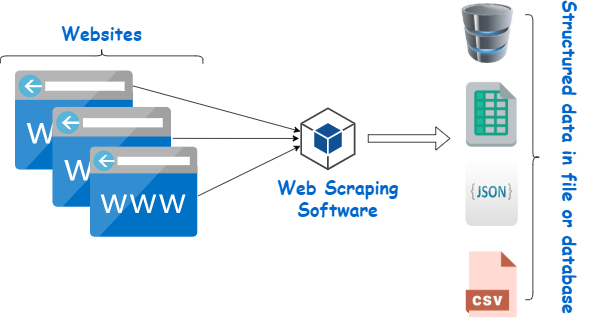
Web scraping is the automated process of extracting data from websites and transferring it into your own systems. Instead of manually copying and pasting information, developers use programming languages like Python to access web pages, interpret their structure, and retrieve specific data efficiently.
So why does web scraping matter? In today’s data driven landscape, access to real time information is a major competitive advantage. According to Bright Data:
- 69% of startups rely on public web data as a primary source for real time insights
- 69% of enterprises use it to power AI driven applications
- 54% of organizations report a positive financial impact from web scraping
These figures highlight how critical web data has become across industries. However, manually collecting and processing this data is time consuming and impractical at scale. Web scraping tools solve this by automating data collection, making it faster, more accurate, and highly scalable.
In practice, businesses use web scraping in many ways. Marketing and sales teams track competitor pricing and customer sentiment across e commerce platforms and social media. Recruiters aggregate job listings from multiple sources. Researchers collect large datasets to support analysis and innovation.
By leveraging web scraping, organizations can reduce manual effort, accelerate data collection, and make more informed decisions. When applied ethically and in compliance with regulations, it becomes a powerful tool for gaining insights, improving competitiveness, and driving innovation.
Why Use Python for Web Scraping?
Python has become the leading choice for web scraping accounting for nearly 70% of usage thanks to its balance of simplicity, flexibility, and powerful ecosystem. It enables developers to build everything from lightweight scripts to large scale data extraction systems with ease.
Rich Ecosystem of Libraries
One of Python’s biggest strengths is its extensive collection of well supported libraries that streamline the entire scraping workflow:
- BeautifulSoup simplifies parsing HTML and XML, making it easy to extract specific elements such as titles, links, and tables.
- Selenium is ideal for dynamic, JavaScript heavy websites, simulating real browser interactions to capture content rendered in real time.
- Scrapy is a robust framework designed for large scale crawling, with built in features for handling requests, following links, and managing data pipelines.
- Requests provides a simple way to send HTTP requests and retrieve responses without dealing with low level networking complexities.
End to End Data Processing Capabilities
Beyond data extraction, Python supports the entire data lifecycle. Libraries like pandas and NumPy help clean and process raw data, while Matplotlib and Seaborn enable visualization for easier analysis. For more advanced use cases, frameworks such as scikit learn and TensorFlow allow teams to apply machine learning to the collected data turning raw information into actionable insights.
Additionally, Python’s vast community and extensive documentation make it highly accessible, even for beginners starting their first scraping projects.
Scalability and Flexibility
Whether you need to extract a small dataset or manage large scale crawling operations, Python adapts effortlessly. Simple scripts using Requests and BeautifulSoup can handle basic tasks, while frameworks like Scrapy support concurrent requests, distributed crawling, and cloud based deployments.
From text and images to structured datasets, Python provides the flexibility to scrape and process virtually any type of web content making it a reliable choice for projects of any size or complexity.
Setting Up Your Environment
Before diving into web scraping with Python, it’s essential to set up a reliable development environment. A proper setup ensures your code runs smoothly, dependencies are managed correctly, and your workflow remains efficient. This includes installing Python, required libraries, and choosing an appropriate development environment (IDE).

Install Python & pip
First things first, do you have Python 3 on your machine? Pop open your terminal and just type to check this:
python –version
If your computer says it’s not found, time to hit up python.org and snag the latest version. Don’t worry, the newer Python comes with pip baked in, so you don’t need to install this package manager separately.
Now, spin up a virtual environment. This helps you keep a cluttered mess of dependencies organized and lets them not be involved in other parts of your systems. Just run this in your terminal to run such a sandbox:
python -m venv scraping-envThen, activate the environment with the following commands:
For macOS/Linux:
source scraping-env/bin/activateFor Windows:
source scraping-env\Scripts\activateOnce the environment is activated, any libraries you install with pip will operate within this sandbox. This keeps your setup clean and conflict free.
Install Required Libraries
Now that you have installed Python, install the libraries for web scraping with pip:
pip install requestspip install beautifulsoup4pip install lxmlpip install seleniumpip install mechanicalsoup- requests – Send HTTP requests
- beautifulsoup4 – Parses and retrieves HTTP elements
- lxml – Executes high performance parsing and XPath queries
- selenium – Scrapes dynamic websites that contain JavaScript based content
- mechanicalsoup – Automates logins and form interactions
You don’t need to install all these libraries. Only choose what you prefer using. If you’re a web scraping newcomer, choose BeautifulSoup4 and Requests because they’re lightweight, easy to learn, and cover the most basic scraping needs.
Choose Your IDE or Notebook
The next step is selecting a development environment that suits your workflow. Popular options for Python web scraping include VS Code, PyCharm, and Jupyter Notebook, each offering distinct advantages.
For beginners, Jupyter Notebook is often the best starting point. It allows you to execute code step by step and view outputs instantly, making it ideal for testing scraping logic, inspecting HTML elements, and experimenting with data extraction in a more interactive way.
As your projects grow in complexity, transitioning to a full featured IDE becomes more practical. VS Code is a lightweight and highly customizable option, with a rich ecosystem of extensions for debugging, environment management, and version control. PyCharm, on the other hand, provides a more comprehensive development experience with advanced debugging tools, project management features, and built in database support making it well suited for large scale or production level scraping projects.
Choosing the right environment ultimately depends on your experience level and project scope, but starting simple and scaling up is often the most effective approach.
Read more: Java vs Kotlin: Which Is Better for Android App Development?
Step by Step Python Web Scraping Tutorial
Now that you have prepared an ideal development environment, let’s move on to a typical workflow of scraping a website with Python.
Step 1. Inspect the Website Structure
Before writing Python code, we need to inspect the website structure first by using Developer Tools. Just right click the link and hit “Inspect” (on Chrome or Firefox doesn’t really matter which). This pops open all the messy HTML code. Then, you can start poking around for stuff like <h1>, <p>, <div>, or <span>. Pay attention to things like class or id it’s like the site’s way of tagging stuff for you.
Here are the usual suspects you’ll run into:
<h1>: This one’s the big headline like, “Welcome to My Blog!” kind of thing.<h2>through<h6>are just smaller headings. Think of them as subtitles or section headers.<p>: That’s your bread and butter for text paragraphs, article bodies, all the wordy stuff.<a>: Links. Obvious but important.<div>: Basically a catch all box. Sites use these everywhere to organize things, even if it looks like it doesn’t do anything.<span>: Smaller than a div, more like a sticky note for tiny bits dates, prices, labels, whatever.<img>: Images, no surprise. It often comes with thesrcattribute to pinpoint the actual sources of the images.
Beyond these tags, you can note several key attributes as follows:
- class groups elements together. For instance, various headlines may share the same
class=”headline”. - id identifies one specific element on the page, such as
id=”main-title”. - href appears in
<a>tags to contain the URL. - src appears in
<img>or<script>tags to show the file location. - alt is the text description for images. This attribute is useful for accessibility and scraping image metadata.
In the example below, we extract the web data from the blog post, “What is an AI agent?” in LangChain’s blogs.
Step 2. Send an HTTP Request with Requests
Next, you’ll leverage the requests library to extract the raw HTML of the page. The following command helps you retrieve the page’s source code for later parsing.
import requestsurl = "https://blog.langchain.com/what-is-an-agent/"response = requests.get(url)requests.get(url)sends an HTTP GET request to the LangChain blog page.response.textreturns the HTML source code of the page as a string.[:500]prints the first 500 characters, so you don’t flood your terminal.
Tip: The server replies with the page content and a status code when the request.get() function sends an HTTP request to the webpage. You can safely work with the content if the status code is 200, which indicates that the request was successful. However, it indicates that something went wrong if the server returns 404 (Not Found) or 500 (Server Error). To check the status code, you can add the following command to the HTTP request:
if response.status_code == 200:print(response.text[:500]) # print the first 500 characters of the pageelse:print(f"Request failed with status code: {response.status_code}")Here’s our complete snippet in this step:
import requestsurl = "https://blog.langchain.com/what-is-an-agent/"response = requests.get(url)if response.status_code == 200:print(response.text[:500]) # print the first 500 characters of the pageelse:print(f"Request failed with status code: {response.status_code}")Step 3. Parse HTML with BeautifulSoup
Now that you extracted the raw HTML, it’s time to parse it with BeautifulSoup to fetch elements.
Here’s an example:
from bs4 import BeautifulSoupsoup = BeautifulSoup(response.text, "html.parser")print(soup.prettify())The .prettify() function here helps you print the entire HTML document in a nice format (with indentation). In case you just want to extract a specific element (e.g., title or headings), you can replace print(soup.prettify()) with the following commands:
To extract the title:
title = soup.title.stringprint("Page Title:", title)In order to extract the main heading:
heading = soup.find("h1").get_text()print("Main Heading:", heading)To extract all links:
for link in soup.find_all("a"):print(link.get("href"))Step 4. Extract Data by Tag, Class, and Attributes
You don’t have to hang onto the whole page once you’ve torn through the HTML. That’s just digital hoarding. Most sites flag the good stuff with tags and CSS classes anyway, so why not just grab exactly what you need? BeautifulSoup is your friend for this. Just tell it what tags or classes you’re after, and it’ll fetch the goods.
Like, in that LangChain blog post example, the content of the article lives inside a <div> with the class article-content. If you wanna snatch all the paragraphs from there, just use a simple command with BeautifulSoup to scoop up every <p> tag inside that section:
content_div = soup.find("div", class_="article-content")if content_div:for para in content_div.find_all("p"):print(para.get_text(strip=True))else:print("No article content found.")Step 5. Parse HTML with lxml and XPath
BeautifulSoup is ideal for simple scraping tasks, like searching for elements by IDs, tag names, or classes. But when the HTML structure is challenging or when you require complex queries and more precision, parse HTML with lxml and XPath.
Below is an example of finding prices with lxml and XPath:
from lxml import htmltree = html.fromstring(response.text)prices = tree.xpath('//span[@class="price"]/text()')print(prices)Step 6. Work with Dynamic Content using Selenium
Some websites load content with JavaScript. In this case, using requests alone won’t work for such dynamic content. That’s why you need to leverage Selenium, which simulates a real browser and allows you to access websites like humans do. Below are two applications of Selenium in extracting dynamic content:
Example: Implement a Google search
from selenium import webdriverfrom selenium.webdriver.common.keys import Keysdriver = webdriver.Firefox()driver.get("https://www.google.com")box = driver.find_element("name", "q")box.send_keys("Python web scraping" + Keys.RETURN)print(driver.title)driver.quit()Example: Scrape product details
Selenium can wait for elements to load and retrieve their text. This capability makes it helpful in e commerce or test sites.
from selenium import webdriverfrom selenium.webdriver.common.by import Byfrom selenium.webdriver.chrome.service import Servicefrom selenium.webdriver.chrome.options import Optionsimport time# --- Setup Selenium ---chrome_options = Options()chrome_options.add_argument("--headless") # Run browser in backgroundchrome_options.add_argument("--disable-gpu")chrome_options.add_argument("--no-sandbox")service = Service("/path/to/chromedriver") # Change path to your chromedriverdriver = webdriver.Chrome(service=service, options=chrome_options)# --- Load Page ---url = "https://example-ecommerce.com/products" # Replace with a real e-commerce pagedriver.get(url)# Wait for JavaScript to load productstime.sleep(5)# --- Scrape Product Details ---products = driver.find_elements(By.CSS_SELECTOR, ".product-card") # Example selectorfor product in products:try:name = product.find_element(By.CSS_SELECTOR, ".product-title").textexcept:name = "N/A"try:price = product.find_element(By.CSS_SELECTOR, ".product-price").textexcept:price = "N/A"try:link = product.find_element(By.TAG_NAME, "a").get_attribute("href")except:link = "N/A"print(f"Name: {name}, Price: {price}, Link: {link}")# --- Quit ---driver.quit()webdriver.Chromehelps launch a Chrome browser.headlessruns Chrome invisibly (without GUI).driver.get(url)helps load the page.time.sleep(5)enables JS to finish loading (or you can use Selenium’sWebDriverWaitfor smarter waits).find_elements(By.CSS_SELECTOR, “.product-card”finds all product cards.
Step 7. Interact with HTML Forms (MechanicalSoup)
MechanicalSoup works best in filling and submitting forms. Let’s take a look at how it works through the following example:
import mechanicalsoupbrowser = mechanicalsoup.StatefulBrowser()browser.open("https://example.com/login")browser.select_form("form")browser["username"] = "myuser"browser["password"] = "mypassword"browser.submit_selected()Step 8. Automate UI Tasks with PyAutoGUI (optional)
In special cases, you may leverage PyAutoGUI to control mouse and keyboard actions. In other words, it allows you to scroll and click when scraping content that requires user like behavior.
import pyautoguipyautogui.scroll(-500) # scroll downStep 9. Clean and Store Data
Once you have extracted the desired data, save it in a structured format by exporting it to CSV, JSON, or a database (such as SQLite or PostgreSQL). For example:
import csvwith open("data.csv", "w", newline="") as f:writer = csv.writer(f)writer.writerow(["Name", "Price"])writer.writerow(["Laptop A", "$1000"])Step 10. Add Error Handling & Respectful Delays
You can add error handling and delays to avoid overwhelming servers. Here’s an example:
import timeimport randomtry:response = requests.get(url, timeout=10)response.raise_for_status()time.sleep(random.uniform(1, 3)) # random delayexcept requests.exceptions.RequestException as e:print("Error:", e)Read more: What is JavaScript? The Engine Driving the Modern Web
Practical Web Scraping Examples
Web scraping is a highly versatile tool with real world applications across industries. Below are three practical use cases that demonstrate how businesses and individuals can leverage it to extract valuable insights from web data.
Scraping News from Websites
Web scraping allows you to aggregate headlines and articles from multiple news sources into a single platform. Instead of navigating between different websites, you can build a personalized news feed, monitor trending topics, and analyze content for keywords or sentiment. This is especially useful for media monitoring, market intelligence, and content research.
Extracting Job Listings from Job Boards
For job seekers and recruiters, consolidating opportunities from multiple platforms can be time consuming. Web scraping simplifies this process by automatically collecting job titles, descriptions, company details, and locations from sites like Indeed or LinkedIn. This enables the creation of custom job dashboards, salary comparisons, and even automated alerts for relevant openings.
Tracking Product Prices on E commerce Sites
In fast moving e commerce environments, product prices, stock levels, and promotions change frequently. Web scraping helps businesses and consumers stay informed by continuously monitoring this data across multiple platforms. Companies can use it for competitor analysis and pricing strategies, while consumers can track deals and make more informed purchasing decisions.
By applying web scraping in these scenarios, organizations can save time, reduce manual effort, and gain actionable insights that support better decision making.
Common Challenges & How to Solve Them
While web scraping is highly effective, it comes with several technical and operational challenges. Understanding these issues and how to address them will help you build more reliable and scalable scraping systems.
1. Changing Website Structures
Websites frequently update their HTML structure. Even small changes in class names, element hierarchy, or layout can break your selectors (e.g., div.article-content, span.price) and cause data extraction failures.
Solutions:
- Use official APIs when available – APIs are typically more stable and version controlled than HTML pages.
- Write flexible selectors – Use XPath or partial matching (e.g.,
//*[contains(@class, 'content')]) to handle minor structural changes. - Regular monitoring and maintenance – Periodically test your scraper and update selectors when issues arise.
- Leverage advanced tools – Techniques like tree based similarity (e.g., XTreePath) can help adapt to structural variations automatically.
2. Rate Limiting and IP Blocking
Websites often detect and block high frequency requests from a single IP address. Default headers (such as standard Python User Agents) and repetitive request patterns can trigger anti bot systems.
Solutions:
- Introduce randomized delays between requests to mimic human behavior.
- Rotate User Agent headers and other request headers (e.g., Referer) to simulate different devices and browsers.
- Use proxy rotation – Rotating IPs (especially residential proxies) help distribute traffic and reduce detection risk.
- Manage sessions and cookies – Maintain realistic browsing behavior by preserving session state across requests.
3. Scaling Large Scale Scraping Operations
As scraping volume increases, challenges such as performance bottlenecks, data management complexity, and reliability issues become more prominent. Running large workloads on a single machine can lead to higher failure rates and increased blocking risk.
Solutions:
- Distribute workloads across multiple servers or cloud functions to improve scalability and reduce per IP risk.
- Use scraping APIs or managed services to handle proxies, retries, and structured outputs more efficiently.
- Implement caching strategies – Avoid redundant requests by caching unchanged pages and using headers like
ETagorLast-Modified. - Monitor system performance – Track metrics such as success rates, latency, and block frequency to detect issues early.
- Optimize tool selection – Use lightweight libraries for static pages, and reserve tools like Selenium or Playwright only for JavaScript heavy content.
By addressing these challenges proactively, you can build robust, efficient, and scalable web scraping systems that deliver consistent results even as complexity grows.
Final Thoughts
To wrap things up, mastering web scraping with Python is like gaining a digital superpower. It turns the vast, messy internet into a structured goldmine of insights, allowing your business to move faster and pivot smarter. Whether you are tracking prices or fueling AI models, Python provides the most robust and flexible engine to get the job done.
However, gathering data is only one side of the coin. In today’s landscape, your business doesn’t just need to consume information it needs to present it with authority. A powerful data strategy deserves an equally powerful home. If you are looking to build a high performance, scalable, and visually stunning digital presence, our professional website design services are here to help. We specialize in creating SEO optimized, user centric websites that don’t just look great but are built to handle the complexities of the modern, data driven web.
Ready to turn your insights into a world class web experience? Let’s build a website that stands out as much as your data does.
FAQs About Python Web Scraping
Is web scraping legal?
Web scraping is legal in many cases, but it depends on how and what you scrape. Always review a website’s terms of service, robots.txt, and ensure compliance with data privacy regulations.
What is the best Python library for web scraping?
It depends on your use case. BeautifulSoup and Requests are great for beginners and static pages, while Selenium is ideal for dynamic content. Scrapy is best for large scale projects.
Can Python scrape JavaScript heavy websites?
Yes, but not with Requests alone. Tools like Selenium or Playwright are required to render JavaScript and extract dynamic content.
How do I avoid getting blocked while scraping?
Use techniques such as adding delays between requests, rotating User Agent headers, using proxies, and mimicking human browsing behavior.
What data formats can I store scraped data in?
Common formats include CSV, JSON, Excel files, or databases like MySQL, PostgreSQL, and MongoDB.
How fast can web scraping run?
Speed depends on factors like website response time, scraping method, and scale. Lightweight scripts can be very fast, while large scale scraping requires optimization and distributed systems.
Do I need coding experience to start web scraping with Python?
Basic Python knowledge is helpful, but beginners can start quickly thanks to simple libraries, tutorials, and strong community support.
Can web scraping be used for AI and machine learning?
Yes. Scraped data is often used to train AI models, perform data analysis, and generate insights for predictive systems.
What are the main challenges in web scraping?
Common challenges include changing website structures, rate limiting, IP blocking, and handling large scale data efficiently.
Why choose Python over other languages for web scraping?
Python offers simplicity, powerful libraries, strong community support, and end to end capabilities from data extraction to processing and machine learning.
Latest Articles
View All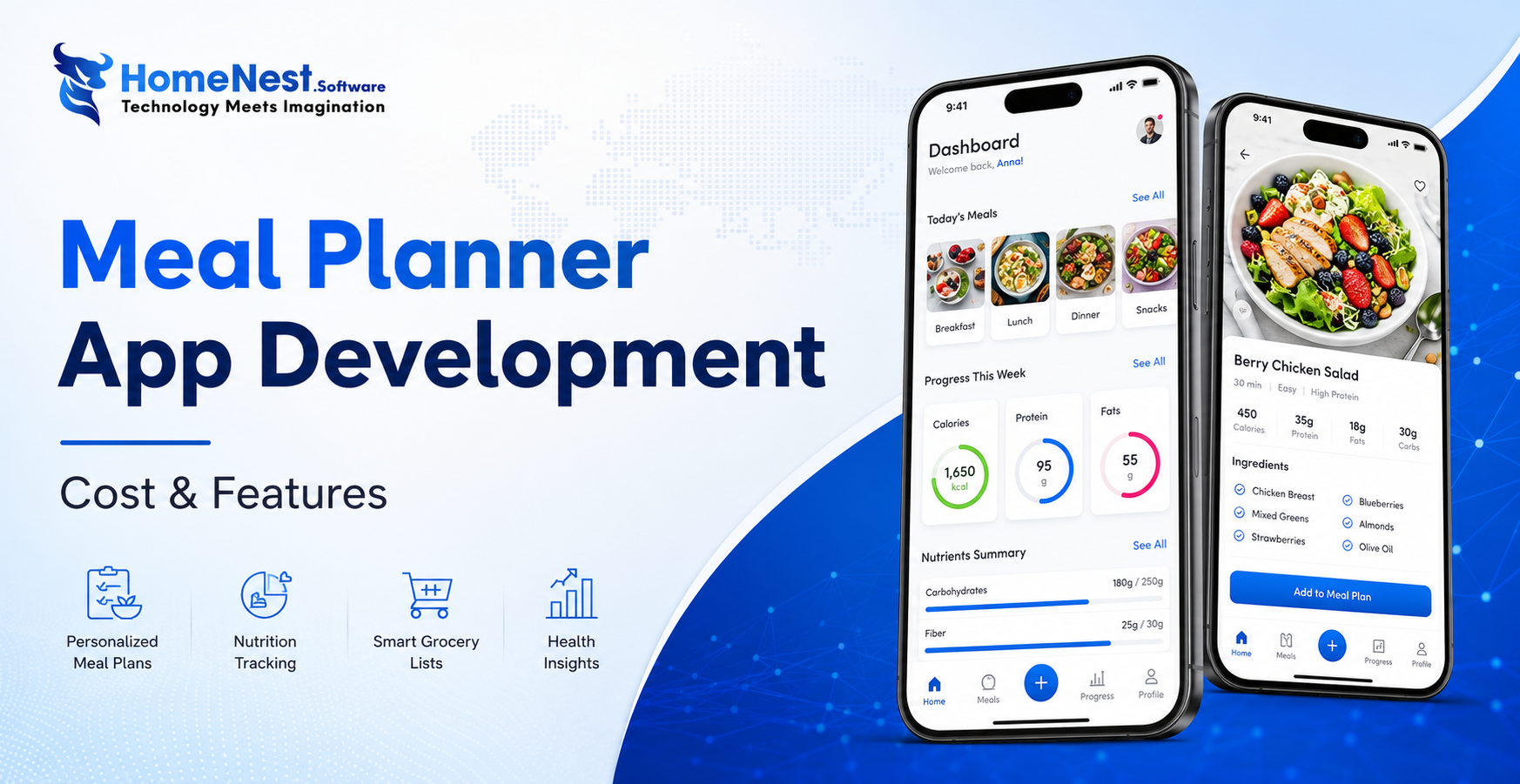
How to Build a Meal Planning App: A Complete Step-by-Step Guide
Building a successful meal planning app goes beyond creating an attractive interface it requires a clear business strategy, personalized user experiences, and scalable technology. By combining essential features like AI-powered meal recommendations, nutrition tracking, grocery list automation, and wearable integration, businesses can deliver lasting value to users while capitalizing on the growing digital health market. Partnering with an experienced mobile app development company ensures your solution is secure, future-ready, and designed to succeed in an increasingly competitive health-tech industry.

How Much Does It Cost to Build a Shopping App Like Temu?
Temu’s meteoric rise to over 900 million global downloads proves the power of combining AI, gamification, and social commerce, but building a similar viral shopping platform requires careful financial and technical planning. Developing an app like Temu typically costs anywhere from $40,000 for a basic Minimum Viable Product (MVP) to over $300,000 for a fully-featured platform. This guide breaks down every cost category, analyzes the core features driving Temu’s success, highlights the best technology stacks, and offers practical strategies to optimize your development budget without compromising on quality.

Criteria For Choosing The Right App Design Agency
UI/UX design is the logical foundation of a system, not merely a visual element. Choosing the wrong partner will directly lead to technical debt, budget overruns, and disruptions in the development process. This article provides a 6-step evaluation framework and a list of operational risks, helping businesses eliminate subjective design advice and accurately assess agency capabilities based on developer handoff standards and practical business performance.
How Does AI in Banking Industry Impact the Future?
Artificial intelligence (AI) has transitioned from a supplementary tool to a core infrastructure of financial data management, optimizing profitability through real-time fraud detection, natural language processing (NLP), and high-speed credit scoring models. “Deploying AI in the financial sector requires more than just algorithmic accuracy, it demands a highly secure cloud architecture and rigorous data governance,” commented Nguyen Tien, co-founder of HomeNest Software. Why read this guide? We skip the theoretical jargon to focus entirely on technical implementation. Whether you’re evaluating a vendor or planning a system overhaul, this article will detail: Operational Efficiency: Automating unstructured data workflows at scale. Risk Architecture: Implementing real-time threat detection and AML compliance. Data ownership: The essential need for 100% ownership of the source code to ensure full algorithm auditability.

How to Make a Banking App like Bank of America?
Developing a mobile banking application like Bank of America extends far beyond basic UI design; it requires engineering a fault-tolerant backend capable of real-time ledger synchronization, biometric authentication, and high-volume data processing under strict regulatory frameworks. Drawing from HomeNest Software’s deep experience in architecting enterprise-grade fintech solutions, this guide strips away theoretical jargon to focus entirely on operational and technical execution. What you will find in this guide: We break down the precise development roadmap, from mapping out microservices and ensuring PCI-DSS compliance to estimating MVP development costs and securing absolute data sovereignty through 100% source code ownership. If you are preparing to build, scale, or audit a financial platform, this blueprint provides the exact framework you need.
Banking App Development Cost
Building a banking application is rarely a simple process; it’s a complex technical challenge requiring a balance between complying with stringent financial regulations, handling large transaction volumes, and a scalable cloud architecture. Miscalculating these technical requirements from the outset often leads to significant technical debt and budget overruns. Based on HomeNest Software’s practical experience in designing enterprise-grade fintech solutions, this guide bypasses generic estimates to provide a realistic analysis of banking application development costs. What you’ll find in this guide: We analyze the true cost factors, from technology selection and API integration to the hidden costs of regulatory compliance and security infrastructure. Whether you’re launching a minimum viable product or expanding an existing financial platform, this analysis provides the precise operational data you need to plan your budget effectively.